Sensors
Sensor blocks read hub/device state and provide data for conditions, events, and control logic.
Device and hub sensors
Hub battery level (Beginner)

Returns current hub battery level.
Hub battery voltage (Advanced)

Returns the selected hub battery voltage in volts.
- Type: numeric reporter block
- Available only for hubs that report battery voltage.
- Returns
NaNwhen the selected hub is not connected.
Device % battery (Beginner)

Returns the current battery level of the phone/tablet device running MOCPilot (in percent).
Board temperature (Advanced)

Returns hub board temperature.
- Available only for
BuWizz 2andBuWizz 3.
Hub accelerometer (Guru)

Returns raw accelerometer data reported by the selected hub.
- Axis options:
x,y,z
Hub acceleration (Guru)

Returns acceleration data reported by the selected hub.
- Axis options:
x,y,z
Button pressed (Beginner)

Checks whether a selected hub button matches the selected state.
-
State options:
pressed,released -
Typical button option:
center(hub-dependent) -
Note: available button options may differ by hub model (different hubs can expose different button sets).
Device type (Beginner)

Returns connected device type for the selected port.
- Type: reporter block
- Typical use: detect what device is connected before running device-specific logic
Device accelerometer (Guru)

Returns raw accelerometer values from device sensors.
- Axis options:
x,y,z
Device acceleration (Guru)

Returns acceleration data from device sensors.
- Axis options:
x,y,z
Orientation and tilt sensors
Device tilt (Advanced)

Returns tilt data from the phone/tablet device running MOCPilot.
- Axis options:
pitch,roll
Tilt (Beginner)

Returns tilt angle for the selected axis.
- Axis options:
pitch,roll,yaw - Note:
yawis available only on hubs that provide yaw data.
Get orientation (Beginner)

Returns current orientation state of the hub.
- Output format options:
text,index - Orientation values:
Front,Top,Right,Back,Bottom,Left
Is orientation up (Beginner)

Checks whether the hub orientation matches selected "up" orientation.
- Orientation options:
Front,Top,Right,Back,Bottom,Left
Set tilt orientation (Advanced)

Configures orientation reference used by tilt/orientation-related blocks.
- Orientation options:
Front,Top,Right,Back,Bottom,Left
Timer and device motion sensors
Timer (Advanced)
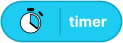
Returns timer value in seconds.
Reset timer (Advanced)
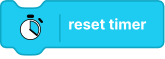
Resets the timer to zero.
Port sensor blocks
Technic distance sensor (Beginner)

Returns distance values from a Technic distance sensor.
- Unit options:
mm,cm,inch,%
Technic when distance is (Beginner)

Triggers/checks distance condition for a Technic distance sensor.
- Compare options:
closer than,farther than,exactly at - Unit options:
mm,cm,inch,%
Technic sensor set mode (Advanced)

This block sets the Technic color sensor to the selected mode.
- Note: Changing the Color Sensor mode can affect your program in unexpected ways. For example, the Technic color sensor can't read colors or reflected light when it's in
"ambient"mode.
Technic color sensor value (Beginner)

Returns detected color value from a Technic distance sensor.
- Output options:
value,string
Technic when color is (Beginner)

Triggers/checks when detected color matches selected color.
Technic reflected light (Beginner)

Returns reflected light intensity.
Technic when reflected light is (Beginner)

Triggers/checks reflected light threshold condition.
- Compare options:
<,=,>
Technic ambient light (Beginner)

Returns ambient light intensity.
Technic when ambient light is (Beginner)

Triggers/checks ambient light threshold condition.
- Compare options:
<,=,>
Technic raw color (Beginner)

Returns raw color channel value from Technic sensor.
- Channel options:
red,green,blue
BOOST sensor distance (Beginner)

Returns distance from a BOOST distance sensor.
- Unit options:
%,cm,inch
BOOST when distance is (Beginner)

Triggers/checks distance condition for BOOST distance sensor.
- Compare options:
closer than,farther than,exactly at - Unit options:
%,cm,inch
BOOST sensor color (Beginner)

Returns color detected by a BOOST sensor.
- Output options:
value,string
BOOST is color (Beginner)

Checks whether BOOST sensor currently detects selected color.
BOOST reflected light (Beginner)

Returns reflected light value from BOOST sensor.
BOOST when reflected light is (Beginner)

Triggers/checks reflected light threshold condition for BOOST sensor.
- Compare options:
<,=,>
Technic Move set power mode (Beginner)

Sets Technic Move power mode.
- Mode options:
normal,boost
BuWizz output voltage (Guru)

Returns the current output voltage reported by a BuWizz hub.
- Available only for supported BuWizz hubs.
BuWizz port current (Guru)

Returns the current draw reported for the selected BuWizz hub port.
- Available only for supported BuWizz hubs and ports.
WeDo 2 distance (Beginner)

Returns distance from WeDo 2 distance sensor.
- Unit options:
%,cm,inch
WeDo 2 when distance is (Beginner)

Triggers/checks distance condition for a WeDo 2 distance sensor.
- Compare options:
closer than,farther than,exactly at - Unit options:
%,cm,inch
WeDo 2 tilt (Beginner)

Returns tilt value from WeDo 2 tilt sensor.
- Axis options:
pitch,roll