Dashboard controllers
These blocks are used to read user input from on-screen controls, react to user actions, and update dashboard UI state.
Global dashboard controller blocks
Set controller color (Advanced)

Changes the visual accent color of the selected dashboard controller.
- Type: command block
- Typical use: indicate runtime states or dynamically change controller style based on conditions
Set controller interactivity (Advanced)

Controls selected dashboard controller interactivity. If interactivity is disabled, the controller does not react to touch input.
- Type: command block
- Typical use: temporarily lock controls during specific logic or safety states
- State options:
enable,disable
Button blocks
Button event (Beginner)
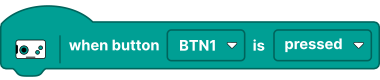
Triggers when the dashboard button changes state (pressed/released).
- Type: event block
- Output: starts connected script
- State options:
pressed,released
Button value (boolean) (Beginner)

Reports current dashboard button state.
- Type: value block
- Output:
true/false - State options:
pressed,released
D-pad blocks
D-pad event (Beginner)

Triggers when D-pad direction changes or matches configured direction.
- Type: event block
- Output: starts connected script
- Direction options:
up,down,left,right - Button state options:
pressed,released
D-pad value (boolean) (Beginner)

Reports whether a selected D-pad direction is active.
- Type: value block
- Output:
true/false - Direction options:
up,down,left,right - Button state options:
pressed,released
Joystick blocks
Joystick event (Beginner)
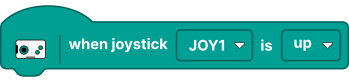
Triggers when joystick position changes.
- Type: event block
- Output: starts connected script
- State options:
up,down,left,right,moved,released
Joystick value (float) (Beginner)

Reports joystick axis value.
- Type: value block
- Output: numeric (float), typically in a normalized range
- Axis options:
x-axis,y-axis
Joystick value (boolean) (Beginner)

Reports whether the selected joystick is pressed or released.
- Type: value block
- Output:
true/false - State options:
pressed,released
Pedals blocks
Pedals event (Beginner)

Triggers when pedal input changes.
- Type: event block
- Output: starts connected script
- Pedal options:
any,brake,acceleration - State options:
moved,pressed,released
Pedals value (float) (Beginner)

Reports pedal analog value.
- Type: value block
- Output: numeric (float)
Pedals value (boolean) (Beginner)

Returns selected state based on whether a specific pedal is pressed or released.
- Type: value block
- Output:
true/false - Pedal options:
brake,acceleration - State options:
pressed,released
Slider blocks
Slider event (Beginner)
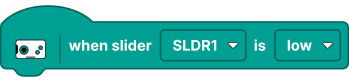
Triggers when slider value changes.
- Type: event block
- Output: starts connected script
- State options:
low,high,moved,released
Slider value (float) (Beginner)

Reports current slider value.
- Type: value block
- Output: numeric (float)
Stepper blocks
Stepper event (Beginner)

Triggers when stepper value changes by a step.
- Type: event block
- Output: starts connected script
- Step options:
any,reset,minus,plus - Button state options:
pressed,released
Stepper value (float) (Beginner)

Reports current stepper value.
- Type: value block
- Output: numeric (float)
Steering wheel blocks
Steering wheel event (Beginner)

Triggers when steering wheel position changes.
- Type: event block
- Output: starts connected script
- State options:
moved,pressed,released
Steering wheel value (float) (Beginner)

Reports current steering wheel value.
- Type: value block
- Output: numeric (float)
Steering wheel value (boolean) (Beginner)

Returns selected state based on whether the steering wheel is pressed or released.
- Type: value block
- Output:
true/false - State options:
moved,pressed,released
Switch blocks
Switch event (Beginner)

Triggers when switch state changes.
- Type: event block
- Output: starts connected script
- Toggle options:
on,off
Switch value (boolean) (Beginner)

Reports current switch state.
- Type: value block
- Output:
true/false - State options:
on,off
Monitor blocks
Monitor show (Beginner)

Displays information (text or value) on the dashboard monitor.
- Type: command block
- Typical use: show battery level, motor angle, current connected device on a hub port, and similar runtime info
Monitor set value (Beginner)

Sets integer value for a dashboard speedometer monitor.
- Type: command block
- Typical use: update speedometer-like monitor value in runtime
Monitor tilt set value (Beginner)

Sets tilt monitor value (pitch/roll) for dashboard tilt monitor.
- Type: command block
- Typical use: display runtime tilt values in dedicated tilt monitor
- Axis options:
pitch,roll