Gamepad
Gamepad blocks are used to react to controller input and read current gamepad state values.
Event blocks
When gamepad button is (Beginner)
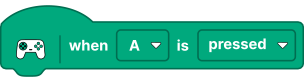
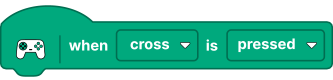
Triggers when the selected gamepad button matches the configured state.
- Type: event block
- Button options (Xbox layout):
A,B,X,Y,LB,RB,LT,RT,LSB,RSB - Button options (Sony layout):
cross,circle,square,triangle,L1,R1,L2,R2,L3,R3 - State options:
pressed,released
When gamepad D-pad is (Beginner)

Triggers when D-pad direction/state matches the selected condition.
- Type: event block
- Direction options:
up,down,left,right - State options:
pressed,released
When gamepad thumbstick is (Beginner)
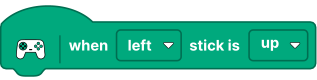
Triggers when thumbstick condition matches selected options.
Based on current options, this block supports:
-
Stick selection:
left/right -
Direction/state selection:
up,down,left,right,moved,released -
Type: event block
-
Typical use: react to directional movement or stick release
Value blocks
Gamepad button value (boolean) (Beginner)


Returns current state of selected gamepad button.
- Type: value block
- Output:
true/false - Button options (Xbox layout):
A,B,X,Y,LB,RB,LT,RT,LSB,RSB - Button options (Sony layout):
cross,circle,square,triangle,L1,R1,L2,R2,L3,R3 - State options:
pressed,released
Gamepad D-pad button value (boolean) (Beginner)

Returns whether selected D-pad direction is currently active.
- Type: value block
- Output:
true/false - Direction options:
up,down,left,right - State options:
pressed,released
Gamepad thumbstick value (float) (Beginner)

Returns numeric thumbstick axis value.
- Type: value block
- Output: numeric (float)
- Default range:
-1to1 - Optional range in gamepad settings:
-100to100 - Stick options:
left,right - Axis options:
x-axis/y-axis
Gamepad trigger pressure value (float) (Beginner)
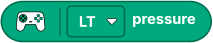
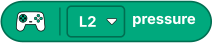
Returns trigger pressure value for selected trigger.
- Type: value block
- Output: numeric (float)
- Default range:
-1to1 - Optional range in gamepad settings:
-100to100 - Trigger options (Xbox layout):
LT,RT - Trigger options (Sony layout):
L2,R2